Designing Event-Driven Microfrontends with Backend-for-Frontend (BFF) Gateways
Modern frontend applications are getting complex. Teams are building larger systems with multiple UI components that need to stay in sync. But traditional approaches like polling APIs or managing shared state across components don’t scale well.
What if your frontend could react to real-time events from your backend? What if different parts of your UI could update automatically when something changes, without complex state management?
┌─────────────────┐    ┌─────────────────┐    ┌─────────────────┐
│   Inventory     │    │   Shopping      │    │  Notifications  │
│  Microfrontend  │    │   Cart          │    │  Microfrontend  │
│                 │    │  Microfrontend  │    │                 │
└─────────┬───────┘    └─────────┬───────┘    └─────────┬───────┘
          │                      │                      │
          │                      │                      │
          ▼                      ▼                      ▼
┌─────────────────────────────────────────────────────────────────┐
│                    BFF Gateway                                  │
│              (Event Aggregator & API Layer)                    │
└─────────────────────┬───────────────────────────────────────────┘
                      │
                      │ WebSocket Events
                      ▼
┌─────────────────────────────────────────────────────────────────┐
│                    Event Bus                                    │
│              (Kafka, NATS, AWS SNS, etc.)                      │
└─────────────────────┬───────────────────────────────────────────┘
                      │
                      │ Backend Events
                      ▼
┌─────────────┐  ┌─────────────┐  ┌─────────────┐  ┌─────────────┐
│   Order     │  │  Inventory  │  │  Payment    │  │  User       │
│  Service    │  │   Service   │  │   Service   │  │  Service    │
└─────────────┘  └─────────────┘  └─────────────┘  └─────────────┘
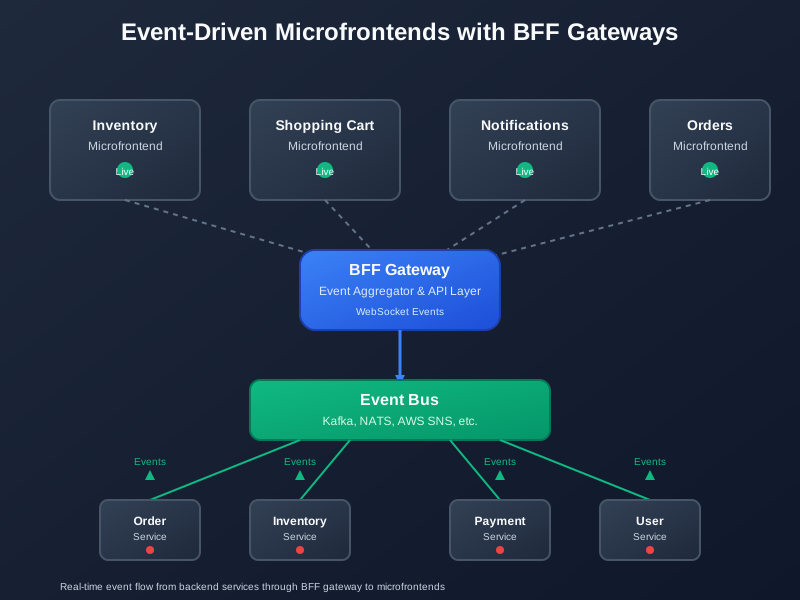
Event-driven microfrontends with BFF gateways create reactive UI systems that respond to backend changes in real time. Each microfrontend focuses on its domain while the BFF coordinates events and provides a unified API.
This approach solves the biggest problems with modern frontend architecture. You get real-time updates without complex state management. You can scale teams independently. And you maintain clear boundaries between different parts of your UI.
The Problem with Traditional Frontend Architecture
Most frontend applications today follow one of two patterns:
Monolithic frontends put everything in one application. All components share the same state, use the same APIs, and deploy together. This works for small teams but becomes a bottleneck as you grow.
Microfrontends without coordination split the UI into separate applications but don’t coordinate between them. Each microfrontend manages its own state and makes its own API calls. This creates inconsistency and duplication.
Both approaches have problems:
State synchronization becomes complex. When the inventory changes, how does the shopping cart know to update? When a user logs in, how do all components know about the new user state?
API coordination is messy. Each microfrontend might call different backend services. You end up with inconsistent data and multiple loading states.
Real-time updates are hard to implement. You either poll APIs constantly or build complex WebSocket connections for each component.
Team coordination breaks down. Frontend teams step on each other’s toes. Changes in one microfrontend break others.
How Event-Driven Microfrontends Solve This
Event-driven microfrontends change the game. Instead of components managing their own state and making direct API calls, they respond to events from a central BFF gateway.
Here’s how it works:
The BFF gateway sits between your microfrontends and your backend services. It aggregates data from multiple services and publishes events when things change.
Microfrontends subscribe to events they care about. When an event arrives, they update their UI automatically.
Backend services publish events when their data changes. The BFF gateway receives these events and forwards them to interested microfrontends.
Event bus handles the communication. It can be Kafka, NATS, AWS SNS, or any message broker that supports real-time events.
The result? Your UI stays in sync automatically. When inventory changes, the shopping cart updates. When a payment completes, the order status changes. When a user logs in, all components know immediately.
Architecture Overview
Let’s break down the key components of this architecture:
Backend-for-Frontend (BFF) Gateway
The BFF gateway is the heart of the system. It does three main things:
API aggregation combines data from multiple backend services into a single response. Instead of your frontend making five API calls, it makes one call to the BFF.
Event coordination listens to backend events and decides which microfrontends need to know about them.
Protocol translation converts backend events into frontend-friendly WebSocket messages.
Microfrontends
Each microfrontend is a self-contained application that handles one domain. They’re built with different technologies, deployed independently, and owned by different teams.
Domain boundaries are clear. The inventory microfrontend only cares about product data. The cart microfrontend only cares about shopping cart state.
Event subscriptions are explicit. Each microfrontend declares what events it wants to receive.
Independent deployment means teams can ship changes without coordinating with others.
Event Bus
The event bus handles communication between backend services and the BFF gateway. It needs to be reliable, scalable, and support real-time delivery.
Message brokers like Kafka or NATS are common choices. They provide durability, ordering, and replay capabilities.
Cloud services like AWS SNS or Google Cloud Pub/Sub offer managed solutions that scale automatically.
WebSocket connections from the BFF to microfrontends provide real-time updates to the browser.
Design Principles
Building event-driven microfrontends requires following some key principles:
Domain-Based Decomposition
Split your microfrontends by business domain, not by technical concerns. Each microfrontend should represent a clear business capability.
Good boundaries: User management, product catalog, shopping cart, order processing, notifications.
Bad boundaries: Header component, footer component, shared utilities, common styles.
The goal is to minimize communication between microfrontends. If two microfrontends need to talk to each other constantly, they might belong together.
Event-Driven Communication
Use events for all communication between microfrontends. Avoid direct API calls or shared state.
Publish events when something changes that other microfrontends might care about.
Subscribe to events that affect your microfrontend’s behavior or display.
Keep events simple and focused. Don’t try to send complex objects or business logic through events.
BFF as Domain Gateway
The BFF gateway should understand your business domains, not just aggregate APIs.
Domain-specific BFFs can be better than one giant BFF. A user BFF might handle authentication and profile data. A commerce BFF might handle products, cart, and orders.
Event filtering happens at the BFF level. It knows which microfrontends care about which events.
Data transformation converts backend data into frontend-friendly formats.
Detailed Example: Retail Order Platform
Let’s build a real example. We’ll create a retail platform with three microfrontends: inventory, shopping cart, and notifications.
The Scenario
A customer is browsing products, adding items to their cart, and receiving real-time updates about inventory changes and order status.
Inventory microfrontend shows product details and availability.
Cart microfrontend displays selected items and handles checkout.
Notifications microfrontend shows alerts about low stock, order confirmations, and shipping updates.
Backend Services
Our backend has four services that publish events:
Product service publishes events when inventory changes, prices update, or new products are added.
Cart service publishes events when items are added, removed, or the cart is cleared.
Order service publishes events when orders are created, confirmed, shipped, or cancelled.
User service publishes events when users log in, log out, or update their profile.
Event Schema
Let’s define the events our system will use:
{
  "eventType": "inventory.updated",
  "timestamp": "2025-10-25T10:30:00Z",
  "source": "product-service",
  "data": {
    "productId": "prod-123",
    "availableQuantity": 5,
    "reservedQuantity": 2,
    "price": 29.99
  }
}
{
"eventType": "cart.item.added",
"timestamp": "2025-10-25T10:31:00Z",
"source": "cart-service",
"data": {
"cartId": "cart-456",
"productId": "prod-123",
"quantity": 1,
"userId": "user-789"
}
}{
"eventType": "order.confirmed",
"timestamp": "2025-10-25T10:32:00Z",
"source": "order-service",
"data": {
"orderId": "order-101",
"userId": "user-789",
"totalAmount": 29.99,
"items": [
{
"productId": "prod-123",
"quantity": 1,
"price": 29.99
}
]
}
}Code Implementation
Now let’s build the actual code. We’ll use Node.js with NestJS for the BFF gateway and React for the microfrontends.
BFF Gateway with NestJS
First, let’s create the BFF gateway that listens to Kafka events and forwards them to microfrontends:
// event-schema.ts
export interface BaseEvent {
  eventType: string;
  timestamp: string;
  source: string;
  data: any;
}

export interface InventoryUpdatedEvent extends BaseEvent {
  eventType: 'inventory.updated';
  data: {
    productId: string;
    availableQuantity: number;
    reservedQuantity: number;
    price: number;
  };
}

export interface CartItemAddedEvent extends BaseEvent {
  eventType: 'cart.item.added';
  data: {
    cartId: string;
    productId: string;
    quantity: number;
    userId: string;
  };
}

export interface OrderConfirmedEvent extends BaseEvent {
  eventType: 'order.confirmed';
  data: {
    orderId: string;
    userId: string;
    totalAmount: number;
    items: Array<{
      productId: string;
      quantity: number;
      price: number;
    }>;
  };
}

export type SystemEvent = InventoryUpdatedEvent | CartItemAddedEvent | OrderConfirmedEvent;
// kafka-consumer.service.ts
import { Injectable, OnModuleInit } from '@nestjs/common';
import { Kafka, Consumer, EachMessagePayload } from 'kafkajs';
import { WebSocketGateway } from './websocket.gateway';
import { SystemEvent } from './event-schema';
@Injectable()
export class KafkaConsumerService implements OnModuleInit {
private consumer: Consumer;
constructor(private webSocketGateway: WebSocketGateway) {
const kafka = new Kafka({
clientId: 'bff-gateway',
brokers: [process.env.KAFKA_BROKER || 'localhost:9092'],
});
this.consumer = kafka.consumer({ groupId: 'bff-gateway-group' });
}
async onModuleInit() {
await this.consumer.connect();
await this.consumer.subscribe({
topics: ['inventory-events', 'cart-events', 'order-events', 'user-events']
});
await this.consumer.run({
eachMessage: async ({ topic, partition, message }: EachMessagePayload) => {
try {
const event: SystemEvent = JSON.parse(message.value?.toString() || '{}');
await this.handleEvent(event);
} catch (error) {
console.error('Error processing message:', error);
}
},
});
}
private async handleEvent(event: SystemEvent) {
console.log('Received event:', event.eventType);
// Determine which microfrontends should receive this event
const targetMicrofrontends = this.getTargetMicrofrontends(event.eventType);
// Forward event to interested microfrontends
for (const microfrontend of targetMicrofrontends) {
await this.webSocketGateway.sendToMicrofrontend(microfrontend, event);
}
}
private getTargetMicrofrontends(eventType: string): string[] {
const mapping = {
'inventory.updated': ['inventory', 'cart'],
'cart.item.added': ['cart', 'notifications'],
'cart.item.removed': ['cart'],
'order.confirmed': ['notifications', 'cart'],
'order.shipped': ['notifications'],
'user.logged_in': ['inventory', 'cart', 'notifications'],
'user.logged_out': ['inventory', 'cart', 'notifications'],
};
return mapping[eventType] || [];
}
}// websocket.gateway.ts
import { WebSocketGateway, WebSocketServer, OnGatewayConnection, OnGatewayDisconnect } from '@nestjs/websockets';
import { Server, Socket } from 'socket.io';
import { SystemEvent } from './event-schema';
@WebSocketGateway({
cors: {
origin: process.env.FRONTEND_URL || 'http://localhost:3000',
},
})
export class WebSocketGateway implements OnGatewayConnection, OnGatewayDisconnect {
@WebSocketServer()
server: Server;
private microfrontendConnections = new Map<string, Set<string>>();
handleConnection(client: Socket) {
console.log('Client connected:', client.id);
// Client identifies which microfrontend it represents
client.on('register-microfrontend', (microfrontendType: string) => {
if (!this.microfrontendConnections.has(microfrontendType)) {
this.microfrontendConnections.set(microfrontendType, new Set());
}
this.microfrontendConnections.get(microfrontendType)?.add(client.id);
client.join(`microfrontend:${microfrontendType}`);
console.log(`Client ${client.id} registered as ${microfrontendType}`);
});
}
handleDisconnect(client: Socket) {
console.log('Client disconnected:', client.id);
// Remove client from all microfrontend groups
for (const [microfrontendType, connections] of this.microfrontendConnections.entries()) {
if (connections.has(client.id)) {
connections.delete(client.id);
if (connections.size === 0) {
this.microfrontendConnections.delete(microfrontendType);
}
}
}
}
async sendToMicrofrontend(microfrontendType: string, event: SystemEvent) {
this.server.to(`microfrontend:${microfrontendType}`).emit('event', event);
console.log(`Sent ${event.eventType} to ${microfrontendType} microfrontend`);
}
}// app.module.ts
import { Module } from '@nestjs/common';
import { KafkaConsumerService } from './kafka-consumer.service';
import { WebSocketGateway } from './websocket.gateway';
@Module({
imports: [],
providers: [KafkaConsumerService, WebSocketGateway],
})
export class AppModule {}React Microfrontend
Now let’s create a React microfrontend that subscribes to events:
// event-hook.ts
import { useEffect, useState } from 'react';
import { io, Socket } from 'socket.io-client';
import { SystemEvent } from './types/event-schema';

export function useEventSubscription(microfrontendType: string) {
  const [socket, setSocket] = useState<Socket | null>(null);
  const [events, setEvents] = useState<SystemEvent[]>([]);

  useEffect(() => {
    const newSocket = io(process.env.REACT_APP_BFF_URL || 'http://localhost:3001');

    newSocket.on('connect', () => {
      console.log('Connected to BFF gateway');
      newSocket.emit('register-microfrontend', microfrontendType);
    });

    newSocket.on('event', (event: SystemEvent) => {
      console.log('Received event:', event);
      setEvents(prev => [...prev, event]);
    });

    newSocket.on('disconnect', () => {
      console.log('Disconnected from BFF gateway');
    });

    setSocket(newSocket);

    return () => {
      newSocket.close();
    };
  }, [microfrontendType]);

  return { socket, events };
}
// inventory-microfrontend.tsx
import React, { useState, useEffect } from 'react';
import { useEventSubscription } from './hooks/event-hook';
import { InventoryUpdatedEvent, CartItemAddedEvent } from './types/event-schema';
interface Product {
id: string;
name: string;
price: number;
availableQuantity: number;
reservedQuantity: number;
}
export function InventoryMicrofrontend() {
const { events } = useEventSubscription('inventory');
const [products, setProducts] = useState<Product[]>([]);
const [loading, setLoading] = useState(true);
// Load initial product data
useEffect(() => {
fetchProducts();
}, []);
// Handle real-time events
useEffect(() => {
events.forEach(event => {
if (event.eventType === 'inventory.updated') {
handleInventoryUpdate(event as InventoryUpdatedEvent);
}
});
}, [events]);
const fetchProducts = async () => {
try {
const response = await fetch('/api/products');
const data = await response.json();
setProducts(data);
} catch (error) {
console.error('Failed to fetch products:', error);
} finally {
setLoading(false);
}
};
const handleInventoryUpdate = (event: InventoryUpdatedEvent) => {
setProducts(prev => prev.map(product =>
product.id === event.data.productId
? {
...product,
availableQuantity: event.data.availableQuantity,
reservedQuantity: event.data.reservedQuantity,
price: event.data.price,
}
: product
));
};
const addToCart = async (productId: string) => {
try {
await fetch('/api/cart/items', {
method: 'POST',
headers: { 'Content-Type': 'application/json' },
body: JSON.stringify({ productId, quantity: 1 }),
});
} catch (error) {
console.error('Failed to add to cart:', error);
}
};
if (loading) {
return <div>Loading products...</div>;
}
return (
<div className="inventory-microfrontend">
<h2>Product Inventory</h2>
<div className="products-grid">
{products.map(product => (
<div key={product.id} className="product-card">
<h3>{product.name}</h3>
<p>Price: ${product.price}</p>
<p>Available: {product.availableQuantity}</p>
<p>Reserved: {product.reservedQuantity}</p>
<button
onClick={() => addToCart(product.id)}
disabled={product.availableQuantity === 0}
>
Add to Cart
</button>
</div>
))}
</div>
</div>
);
}// cart-microfrontend.tsx
import React, { useState, useEffect } from 'react';
import { useEventSubscription } from './hooks/event-hook';
import { CartItemAddedEvent, InventoryUpdatedEvent, OrderConfirmedEvent } from './types/event-schema';
interface CartItem {
productId: string;
name: string;
quantity: number;
price: number;
availableQuantity: number;
}
export function CartMicrofrontend() {
const { events } = useEventSubscription('cart');
const [cartItems, setCartItems] = useState<CartItem[]>([]);
const [loading, setLoading] = useState(true);
useEffect(() => {
fetchCartItems();
}, []);
useEffect(() => {
events.forEach(event => {
switch (event.eventType) {
case 'cart.item.added':
handleCartItemAdded(event as CartItemAddedEvent);
break;
case 'inventory.updated':
handleInventoryUpdate(event as InventoryUpdatedEvent);
break;
case 'order.confirmed':
handleOrderConfirmed(event as OrderConfirmedEvent);
break;
}
});
}, [events]);
const fetchCartItems = async () => {
try {
const response = await fetch('/api/cart/items');
const data = await response.json();
setCartItems(data);
} catch (error) {
console.error('Failed to fetch cart items:', error);
} finally {
setLoading(false);
}
};
const handleCartItemAdded = (event: CartItemAddedEvent) => {
// Refresh cart items when something is added
fetchCartItems();
};
const handleInventoryUpdate = (event: InventoryUpdatedEvent) => {
// Update available quantity for items in cart
setCartItems(prev => prev.map(item =>
item.productId === event.data.productId
? { ...item, availableQuantity: event.data.availableQuantity }
: item
));
};
const handleOrderConfirmed = (event: OrderConfirmedEvent) => {
// Clear cart when order is confirmed
setCartItems([]);
};
const removeFromCart = async (productId: string) => {
try {
await fetch(`/api/cart/items/${productId}`, {
method: 'DELETE',
});
fetchCartItems();
} catch (error) {
console.error('Failed to remove from cart:', error);
}
};
const checkout = async () => {
try {
await fetch('/api/orders', {
method: 'POST',
headers: { 'Content-Type': 'application/json' },
body: JSON.stringify({ items: cartItems }),
});
} catch (error) {
console.error('Failed to checkout:', error);
}
};
if (loading) {
return <div>Loading cart...</div>;
}
const total = cartItems.reduce((sum, item) => sum + (item.price * item.quantity), 0);
return (
<div className="cart-microfrontend">
<h2>Shopping Cart</h2>
{cartItems.length === 0 ? (
<p>Your cart is empty</p>
) : (
<>
{cartItems.map(item => (
<div key={item.productId} className="cart-item">
<h4>{item.name}</h4>
<p>Quantity: {item.quantity}</p>
<p>Price: ${item.price}</p>
<p>Available: {item.availableQuantity}</p>
<button onClick={() => removeFromCart(item.productId)}>
Remove
</button>
</div>
))}
<div className="cart-total">
<h3>Total: ${total.toFixed(2)}</h3>
<button onClick={checkout}>Checkout</button>
</div>
</>
)}
</div>
);
}// notifications-microfrontend.tsx
import React, { useState, useEffect } from 'react';
import { useEventSubscription } from './hooks/event-hook';
import { SystemEvent } from './types/event-schema';
interface Notification {
id: string;
type: 'info' | 'success' | 'warning' | 'error';
title: string;
message: string;
timestamp: Date;
read: boolean;
}
export function NotificationsMicrofrontend() {
const { events } = useEventSubscription('notifications');
const [notifications, setNotifications] = useState<Notification[]>([]);
useEffect(() => {
events.forEach(event => {
const notification = createNotificationFromEvent(event);
if (notification) {
setNotifications(prev => [notification, ...prev]);
}
});
}, [events]);
const createNotificationFromEvent = (event: SystemEvent): Notification | null => {
switch (event.eventType) {
case 'cart.item.added':
return {
id: `cart-${Date.now()}`,
type: 'success',
title: 'Item Added to Cart',
message: 'Product has been added to your shopping cart',
timestamp: new Date(event.timestamp),
read: false,
};
case 'order.confirmed':
return {
id: `order-${Date.now()}`,
type: 'success',
title: 'Order Confirmed',
message: `Your order #${event.data.orderId} has been confirmed`,
timestamp: new Date(event.timestamp),
read: false,
};
case 'inventory.updated':
if (event.data.availableQuantity === 0) {
return {
id: `inventory-${Date.now()}`,
type: 'warning',
title: 'Product Out of Stock',
message: 'A product in your cart is now out of stock',
timestamp: new Date(event.timestamp),
read: false,
};
}
return null;
default:
return null;
}
};
const markAsRead = (id: string) => {
setNotifications(prev => prev.map(notification =>
notification.id === id ? { ...notification, read: true } : notification
));
};
const clearAll = () => {
setNotifications([]);
};
const unreadCount = notifications.filter(n => !n.read).length;
return (
<div className="notifications-microfrontend">
<div className="notifications-header">
<h2>Notifications</h2>
{unreadCount > 0 && <span className="unread-badge">{unreadCount}</span>}
<button onClick={clearAll}>Clear All</button>
</div>
{notifications.length === 0 ? (
<p>No notifications</p>
) : (
<div className="notifications-list">
{notifications.map(notification => (
<div
key={notification.id}
className={`notification ${notification.type} ${notification.read ? 'read' : 'unread'}`}
onClick={() => markAsRead(notification.id)}
>
<h4>{notification.title}</h4>
<p>{notification.message}</p>
<small>{notification.timestamp.toLocaleTimeString()}</small>
</div>
))}
</div>
)}
</div>
);
}Best Practices
Building event-driven microfrontends requires following some key practices:
Avoid Tight Coupling
Don’t make microfrontends depend on each other’s internal structure. Use events as the only communication mechanism.
Good: Cart microfrontend listens to inventory events to show availability.
Bad: Cart microfrontend directly calls inventory microfrontend’s API.
Good: Notifications microfrontend listens to order events to show confirmations.
Bad: Order microfrontend directly tells notifications microfrontend what to display.
Manage Schema Evolution
Event schemas will change over time. Plan for backward compatibility and graceful degradation.
Version your events with semantic versioning. Include version information in event headers.
Use optional fields for new data. Don’t break existing consumers when you add fields.
Deprecate gracefully by keeping old event types around for a while before removing them.
Test schema changes in staging environments before deploying to production.
Performance Tips
Event-driven systems can generate a lot of traffic. Optimize for performance from the start.
Filter events at the BFF level. Don’t send events to microfrontends that don’t need them.
Batch updates when possible. If multiple events arrive quickly, combine them into a single update.
Use WebSocket compression to reduce bandwidth usage.
Implement connection pooling for WebSocket connections to handle many concurrent users.
Cache frequently accessed data in the BFF to reduce backend calls.
Error Handling
Event-driven systems need robust error handling. Events can arrive out of order, get duplicated, or fail to process.
Implement retry logic for failed event processing. Use exponential backoff to avoid overwhelming the system.
Use dead letter queues for events that can’t be processed after multiple retries.
Handle duplicate events gracefully. Make your event handlers idempotent.
Monitor event processing with metrics and alerting. Know when events are failing or taking too long.
Tooling and Frameworks
The right tools make building event-driven microfrontends much easier:
Microfrontend Frameworks
Nx monorepo provides excellent support for microfrontends. You can share code between microfrontends while keeping them independent.
Module Federation with Webpack lets you share components and utilities between microfrontends at runtime.
Single-spa is a framework for building microfrontend applications. It handles routing and lifecycle management.
qiankun is a microfrontend framework based on single-spa, popular in the Chinese development community.
Event Streaming Platforms
Apache Kafka is the most popular choice for event streaming. It’s reliable, scalable, and handles high throughput.
NATS is simpler than Kafka but still powerful. It’s great for real-time messaging and event streaming.
AWS SNS/SQS provides managed event streaming for AWS users. It’s easy to set up and scales automatically.
Google Cloud Pub/Sub offers similar managed event streaming for Google Cloud users.
Redis Streams can handle event streaming for smaller applications. It’s simple and fast.
BFF Frameworks
NestJS provides excellent support for building BFF gateways. It has built-in WebSocket support and integrates well with message brokers.
Express.js is simpler but requires more manual setup for WebSocket connections and event handling.
Fastify is faster than Express and has good plugin support for WebSocket and event streaming.
Apollo Federation can be used to build GraphQL-based BFFs that aggregate data from multiple services.
Development Tools
Docker Compose makes it easy to run the entire stack locally, including Kafka, the BFF gateway, and microfrontends.
Kafka UI provides a web interface for monitoring Kafka topics and messages.
Socket.IO makes WebSocket connections easier to implement and debug.
React DevTools help debug microfrontend state and event handling.
Conclusion
Event-driven microfrontends with BFF gateways represent a significant evolution in frontend architecture. They solve the fundamental problems of scaling frontend teams while maintaining real-time responsiveness.
The benefits are clear: better team autonomy, real-time updates, cleaner separation of concerns, and more maintainable code. But the approach requires thinking differently about how frontend applications work.
You’re not just building components that make API calls. You’re building a distributed system where different parts of your UI react to events from your backend. This creates new challenges around event design, error handling, and debugging.
The key is to start simple. Pick one microfrontend and one event type. Build the BFF gateway to handle that one case. See how it feels. Then gradually expand to more microfrontends and more event types.
The future of frontend development is distributed and event-driven. Teams that adopt these patterns early will have a significant advantage in building scalable, maintainable applications.
The question isn’t whether you’ll need event-driven microfrontends, but when you’ll start building them. The sooner you begin, the more experience you’ll have when the complexity of your application demands this approach.
Discussion
Loading comments...