Designing Secure and Composable AI Agents with Function-Level Sandboxing
AI agents are getting smarter. They can now call APIs, read databases, and even interact with your file system. But here’s the thing - giving an AI agent full access to your tools is like handing your house keys to a stranger. You need boundaries.
This article shows you how to build secure AI agents using function-level sandboxing. We’ll cover the real problems you’ll face, practical solutions, and code you can actually use.
The Problem We’re Solving
Let me tell you about a few disasters I’ve seen:
Case 1: The Over-Permissive Toolkit A team built an AI agent that could “help with data analysis.” They gave it access to their entire database. The agent was supposed to generate reports, but instead it started deleting tables when it got confused about a query. They lost three months of customer data.
Case 2: The API Key Leak Another team let their agent make HTTP calls to external services. The agent was supposed to fetch weather data, but it ended up posting internal API keys to a public GitHub repository. The keys had admin access to their production systems.
Case 3: The File System Nightmare One developer gave their agent read-write access to the entire file system. The agent was supposed to organize documents, but it started moving files around randomly. It took them two weeks to figure out where everything went.
These aren’t edge cases. They happen because we’re giving AI agents too much power without proper controls.
Why Traditional Security Doesn’t Work
API keys and user permissions work great for humans. Humans understand context. They know not to delete the production database at 3 AM.
AI agents don’t have that context. They’ll do exactly what you tell them to do, even if it’s dangerous. They can’t distinguish between “read the customer data” and “delete the customer data” unless you explicitly tell them.
Traditional security assumes the user is making conscious decisions. With AI agents, the “user” is a language model that might hallucinate or get confused. You need different rules.
Function-Level Sandboxing: The Solution
Function-level sandboxing means giving each agent only the tools it actually needs, with strict limits on what it can do with them.
Think of it like this: instead of giving an agent a master key to your entire system, you give it specific keys for specific doors, and those keys expire after a certain time.
Here’s how it works:
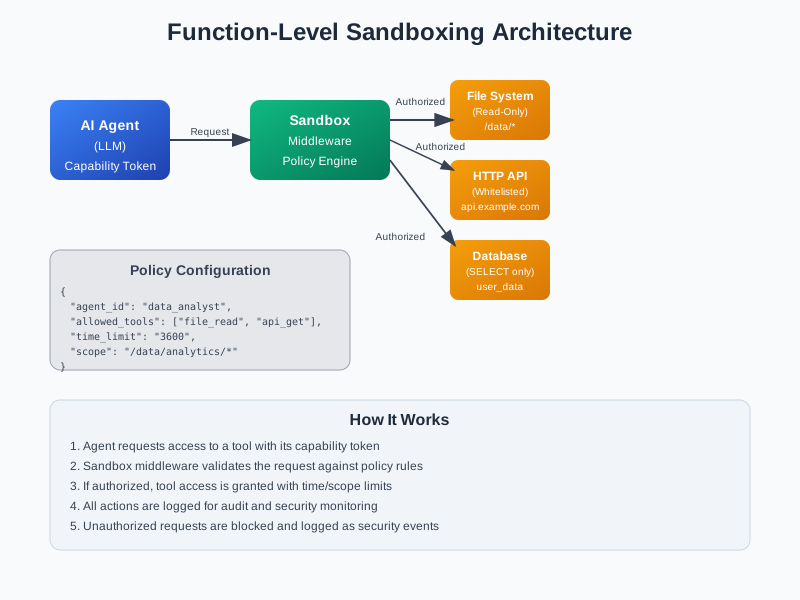
- Capability Tokens: Each agent gets a token that lists exactly what it can do
- Policy Enforcement: Every action goes through a middleware that checks if it’s allowed
- Time and Scope Limits: Access expires automatically, and agents can only touch specific resources
The Architecture
The diagram above shows the basic flow. The AI agent requests access to a tool, the sandbox middleware checks the policy, and if authorized, the tool access is granted with strict limits.
Implementation Blueprint
Let’s build this step by step. I’ll show you the core components you need.
1. The Capability Token System
First, we need a way to define what each agent can do:
from dataclasses import dataclass
from typing import List, Dict, Any
from datetime import datetime, timedelta
import json

@dataclass
class CapabilityToken:
    agent_id: str
    allowed_tools: List[str]
    time_limit: int  # seconds
    scope: str  # resource scope like "/data/analytics/*"
    expires_at: datetime

    def is_valid(self) -> bool:
        return datetime.now() < self.expires_at

    def can_access_tool(self, tool_name: str) -> bool:
        return tool_name in self.allowed_tools and self.is_valid()

    def to_dict(self) -> Dict[str, Any]:
        return {
            "agent_id": self.agent_id,
            "allowed_tools": self.allowed_tools,
            "time_limit": self.time_limit,
            "scope": self.scope,
            "expires_at": self.expires_at.isoformat()
        }

    @classmethod
    def from_dict(cls, data: Dict[str, Any]) -> 'CapabilityToken':
        return cls(
            agent_id=data["agent_id"],
            allowed_tools=data["allowed_tools"],
            time_limit=data["time_limit"],
            scope=data["scope"],
            expires_at=datetime.fromisoformat(data["expires_at"])
        )
2. The Sandbox Middleware
This is where the magic happens. Every tool call goes through here:
import logging
from functools import wraps
from typing import Callable, Any
import re

class SandboxMiddleware:
    def __init__(self):
        self.logger = logging.getLogger(__name__)
        self.policies = {}

    def register_policy(self, agent_id: str, policy: Dict[str, Any]):
        """Register a policy for an agent"""
        self.policies[agent_id] = policy
        self.logger.info(f"Registered policy for agent {agent_id}")

    def check_permission(self, agent_id: str, tool_name: str, resource: str = None) -> bool:
        """Check if an agent can access a tool"""
        if agent_id not in self.policies:
            self.logger.warning(f"No policy found for agent {agent_id}")
            return False

        policy = self.policies[agent_id]

        # Check if tool is allowed
        if tool_name not in policy.get("allowed_tools", []):
            self.logger.warning(f"Tool {tool_name} not allowed for agent {agent_id}")
            return False

        # Check scope if resource is specified
        if resource and "scope" in policy:
            scope_pattern = policy["scope"].replace("*", ".*")
            if not re.match(scope_pattern, resource):
                self.logger.warning(f"Resource {resource} not in scope for agent {agent_id}")
                return False

        return True

    def log_action(self, agent_id: str, tool_name: str, resource: str, success: bool):
        """Log all agent actions for audit"""
        action = {
            "timestamp": datetime.now().isoformat(),
            "agent_id": agent_id,
            "tool_name": tool_name,
            "resource": resource,
            "success": success
        }
        self.logger.info(f"Agent action: {json.dumps(action)}")

    def sandboxed_tool(self, tool_name: str):
        """Decorator to sandbox a tool function"""
        def decorator(func: Callable) -> Callable:
            @wraps(func)
            def wrapper(*args, **kwargs):
                # Extract agent_id from kwargs or first argument
                agent_id = kwargs.get('agent_id') or (args[0] if args else None)
                resource = kwargs.get('resource') or (args[1] if len(args) > 1 else None)

                if not agent_id:
                    raise ValueError("agent_id is required for sandboxed tools")

                # Check permissions
                if not self.check_permission(agent_id, tool_name, resource):
                    self.log_action(agent_id, tool_name, resource, False)
                    raise PermissionError(f"Agent {agent_id} not authorized to use {tool_name}")

                # Execute the function
                try:
                    result = func(*args, **kwargs)
                    self.log_action(agent_id, tool_name, resource, True)
                    return result
                except Exception as e:
                    self.log_action(agent_id, tool_name, resource, False)
                    raise

            return wrapper
        return decorator

# Global middleware instance
sandbox = SandboxMiddleware()
3. Sandboxed Tool Implementations
Now let’s create some safe tool wrappers:
import os
import requests
from pathlib import Path

class SandboxedFileSystem:
    @staticmethod
    @sandbox.sandboxed_tool("file_read")
    def read_file(agent_id: str, file_path: str) -> str:
        """Read a file with sandboxing"""
        try:
            with open(file_path, 'r') as f:
                return f.read()
        except Exception as e:
            raise IOError(f"Failed to read file {file_path}: {str(e)}")

    @staticmethod
    @sandbox.sandboxed_tool("file_list")
    def list_directory(agent_id: str, directory_path: str) -> List[str]:
        """List directory contents with sandboxing"""
        try:
            return os.listdir(directory_path)
        except Exception as e:
            raise IOError(f"Failed to list directory {directory_path}: {str(e)}")

class SandboxedHTTPClient:
    @staticmethod
    @sandbox.sandboxed_tool("http_get")
    def get(agent_id: str, url: str, **kwargs) -> requests.Response:
        """Make HTTP GET request with sandboxing"""
        try:
            response = requests.get(url, **kwargs)
            return response
        except Exception as e:
            raise IOError(f"HTTP GET failed for {url}: {str(e)}")

    @staticmethod
    @sandbox.sandboxed_tool("http_post")
    def post(agent_id: str, url: str, **kwargs) -> requests.Response:
        """Make HTTP POST request with sandboxing"""
        try:
            response = requests.post(url, **kwargs)
            return response
        except Exception as e:
            raise IOError(f"HTTP POST failed for {url}: {str(e)}")

class SandboxedDatabase:
    @staticmethod
    @sandbox.sandboxed_tool("db_query")
    def execute_query(agent_id: str, query: str, connection) -> Any:
        """Execute database query with sandboxing"""
        # Only allow SELECT queries
        if not query.strip().upper().startswith('SELECT'):
            raise PermissionError("Only SELECT queries are allowed")

        try:
            cursor = connection.cursor()
            cursor.execute(query)
            return cursor.fetchall()
        except Exception as e:
            raise IOError(f"Database query failed: {str(e)}")
4. Policy Configuration
Here’s how you define policies for different agents:
{
  "data_analyst": {
    "allowed_tools": ["file_read", "file_list", "db_query"],
    "time_limit": 3600,
    "scope": "/data/analytics/*",
    "description": "Can read analytics data and query database"
  },
  "content_writer": {
    "allowed_tools": ["file_read", "http_get"],
    "time_limit": 1800,
    "scope": "/content/*",
    "description": "Can read content files and fetch external data"
  },
  "system_monitor": {
    "allowed_tools": ["file_list", "http_get"],
    "time_limit": 300,
    "scope": "/logs/*",
    "description": "Can monitor system logs and health endpoints"
  }
}
5. Putting It All Together
Here’s how you’d use this in practice:
def main():
    # Set up logging
    logging.basicConfig(level=logging.INFO)

    # Load policies
    with open('agent_policies.json', 'r') as f:
        policies = json.load(f)

    # Register policies
    for agent_id, policy in policies.items():
        sandbox.register_policy(agent_id, policy)

    # Example: Data analyst agent
    agent_id = "data_analyst"

    try:
        # This will work - file is in allowed scope
        content = SandboxedFileSystem.read_file(
            agent_id=agent_id,
            file_path="/data/analytics/sales_report.csv"
        )
        print("Successfully read file")

        # This will fail - file is outside allowed scope
        try:
            SandboxedFileSystem.read_file(
                agent_id=agent_id,
                file_path="/etc/passwd"
            )
        except PermissionError as e:
            print(f"Access denied: {e}")

        # This will work - HTTP GET is allowed
        response = SandboxedHTTPClient.get(
            agent_id=agent_id,
            url="https://api.example.com/weather"
        )
        print(f"HTTP request successful: {response.status_code}")

    except Exception as e:
        print(f"Error: {e}")

if __name__ == "__main__":
    main()
Integration with Popular Frameworks
You can integrate this sandboxing approach with existing AI agent frameworks:
OpenDevin Integration
from opendevin import Agent

class SandboxedOpenDevinAgent(Agent):
    def __init__(self, agent_id: str, policy: Dict[str, Any]):
        super().__init__()
        self.agent_id = agent_id
        sandbox.register_policy(agent_id, policy)

    def execute_tool(self, tool_name: str, **kwargs):
        # All tool executions go through sandbox
        kwargs['agent_id'] = self.agent_id
        return super().execute_tool(tool_name, **kwargs)
LangGraph Integration
from langgraph import StateGraph

def create_sandboxed_langgraph_agent(agent_id: str, policy: Dict[str, Any]):
    # Register policy
    sandbox.register_policy(agent_id, policy)

    def sandboxed_node(state):
        # Your agent logic here
        # All tool calls will be sandboxed
        pass

    # Build your graph with sandboxed nodes
    workflow = StateGraph(sandboxed_node)
    return workflow.compile()
Best Practices
Here are the key principles to follow:
1. Principle of Least Privilege
Give agents only what they need. If an agent is supposed to read files, don’t give it write access. If it needs to query a database, only give it SELECT permissions.
2. Time-Limited Access
Capability tokens should expire. Don’t give agents permanent access to anything. Set reasonable time limits based on the task.
3. Comprehensive Logging
Log everything. Every tool call, every permission check, every failure. You need to know what your agents are doing.
4. Scope Restrictions
Use file paths, database schemas, and API endpoints to limit what agents can access. Don’t give them access to everything.
5. Regular Policy Reviews
Review and update your policies regularly. As your agents evolve, their permissions should evolve too.
Advanced Features
Integration with Casbin
For complex permission systems, you can integrate with Casbin:
import casbin

class CasbinPolicyEngine:
    def __init__(self, model_path: str, policy_path: str):
        self.enforcer = casbin.Enforcer(model_path, policy_path)

    def check_permission(self, agent_id: str, tool_name: str, resource: str) -> bool:
        return self.enforcer.enforce(agent_id, resource, tool_name)
Open Policy Agent (OPA) Integration
For even more sophisticated policies:
import requests

class OPAPolicyEngine:
    def __init__(self, opa_url: str):
        self.opa_url = opa_url

    def check_permission(self, agent_id: str, tool_name: str, resource: str) -> bool:
        policy_input = {
            "agent_id": agent_id,
            "tool_name": tool_name,
            "resource": resource
        }

        response = requests.post(
            f"{self.opa_url}/v1/data/agent_permissions",
            json={"input": policy_input}
        )

        return response.json().get("result", False)
Security Considerations
1. Token Management
Store capability tokens securely. Use proper encryption and rotation. Don’t hardcode them in your source code.
2. Network Security
If your agents make network calls, use proper TLS/SSL. Validate certificates and use secure protocols.
3. Input Validation
Always validate inputs before passing them to tools. Don’t trust user input or agent-generated content.
4. Resource Limits
Set limits on memory usage, CPU time, and network bandwidth. Agents shouldn’t be able to consume unlimited resources.
Moving Toward Zero-Trust AI
The future of AI agent security is zero-trust. Every action should be verified, every permission should be explicit, and every access should be logged.
This isn’t just about preventing disasters. It’s about building AI systems that you can actually trust in production. Systems that can work with your data without putting it at risk.
The sandboxing approach I’ve shown you is a starting point. As AI agents become more capable, we’ll need even more sophisticated security controls. But the principles remain the same: least privilege, explicit permissions, and comprehensive monitoring.
Start with these basics. Build your security layer first, then add the AI capabilities. Your future self will thank you.
Conclusion
AI agents are powerful tools, but they need proper boundaries. Function-level sandboxing gives you the control you need to deploy them safely.
The key is to think of security as a first-class citizen in your agent architecture. Don’t bolt it on later. Build it in from the start.
Use capability tokens to define what agents can do. Use middleware to enforce those limits. Use logging to monitor what’s happening. And always follow the principle of least privilege.
Your agents will be more secure, your data will be safer, and you’ll sleep better at night knowing that your AI systems can’t accidentally destroy your infrastructure.
The code examples in this article are production-ready. Start with them, adapt them to your needs, and build the secure AI agent system your organization deserves.
Discussion
Loading comments...