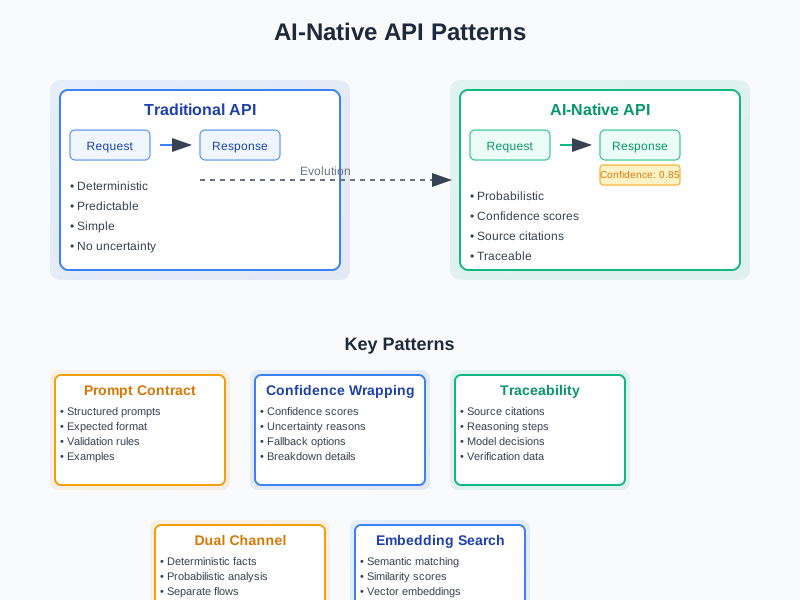
Designing AI-Native APIs: Patterns for Prompt-Aware Software Contracts
Most APIs today follow familiar patterns. You send a request, get a response. The response is predictable. If you ask for user data, you get user data. If you ask for a calculation, you get a number.
But AI changes everything.
When you call an AI API, you don’t get a simple response. You get a probability. A confidence score. Maybe some citations. The response might be different each time, even with the same input. Traditional REST and GraphQL APIs weren’t built for this uncertainty.
This is where AI-native APIs come in. They’re designed from the ground up to handle the messy, probabilistic nature of AI systems. They include confidence scores, grounding sources, and prompt contracts that make AI responses more reliable and traceable.
Why Traditional APIs Fall Short
Traditional APIs work great for deterministic systems. You call a database API, you get the exact record you asked for. You call a payment API, you get a clear success or failure response.
AI systems are different. They deal in probabilities, not certainties. When you ask an AI to summarize a document, it might give you a different summary each time. When you ask it to classify an image, it might be 95% confident about “cat” but also 3% confident about “dog.”
This creates several problems:
Uncertainty: How do you know if the AI’s response is reliable?
Traceability: Where did the AI get its information? Can you verify the sources?
Consistency: How do you handle the fact that the same input might produce different outputs?
Versioning: How do you update prompts and models without breaking existing integrations?
Traditional APIs don’t have answers for these questions. They assume deterministic behavior. AI-native APIs are built to handle the uncertainty that comes with AI systems.
Core Principles of AI-Native APIs
Determinism vs Probabilistic Outputs
Traditional APIs are deterministic. Same input, same output, every time. AI APIs are probabilistic. Same input, different output, with varying confidence levels.
This isn’t a bug—it’s a feature. AI systems are designed to handle ambiguity and uncertainty. But your API needs to communicate this uncertainty clearly.
// Traditional API response
interface UserResponse {
  id: string;
  name: string;
  email: string;
}

// AI-native API response
interface AIResponse<T> {
  data: T;
  confidence: number;
  alternatives?: Array<{
    data: T;
    confidence: number;
  }>;
  sources?: Source[];
  model_version: string;
  prompt_version: string;
}
The AI response includes confidence scores, alternative interpretations, and source citations. This gives consumers the information they need to make informed decisions about how to use the response.
Versioning Prompts and Models
AI systems have two types of versioning: model versions and prompt versions. Both can affect the output significantly.
Model versions change the underlying AI model. GPT-3.5 vs GPT-4, for example. These changes can dramatically alter response quality and style.
Prompt versions change how you ask the AI to do something. A small change in wording can lead to completely different outputs. This makes prompt versioning critical for maintaining consistent behavior.
interface AIRequest {
  prompt: string;
  prompt_version: string;
  model_version: string;
  temperature?: number;
  max_tokens?: number;
}

interface AIResponse<T> {
  data: T;
  confidence: number;
  model_version: string;
  prompt_version: string;
  tokens_used: number;
  processing_time_ms: number;
}
By including version information in both requests and responses, you can track how changes affect your system’s behavior.
Embedding-Based Search APIs
Traditional search APIs return exact matches. AI-native search APIs return semantic matches based on meaning, not just keywords.
interface SemanticSearchRequest {
  query: string;
  limit?: number;
  threshold?: number; // Minimum similarity score
  filters?: Record<string, any>;
}

interface SemanticSearchResponse {
  results: Array<{
    content: string;
    similarity_score: number;
    source: Source;
    metadata: Record<string, any>;
  }>;
  query_embedding: number[];
  total_matches: number;
}
The response includes similarity scores and the actual embedding vector used for the search. This allows consumers to understand why certain results were returned and potentially refine their search.
Including Confidence, Citations, and Grounding
Every AI response should include metadata about its reliability and sources. This is crucial for building trustworthy AI applications.
interface GroundedAIResponse<T> {
  data: T;
  confidence: number;
  sources: Source[];
  reasoning?: string;
  limitations?: string[];
  model_info: {
    name: string;
    version: string;
    training_data_cutoff: string;
  };
}

interface Source {
  id: string;
  type: 'document' | 'database' | 'api' | 'web';
  url?: string;
  title?: string;
  excerpt?: string;
  relevance_score: number;
}
This structure makes it clear where the AI got its information and how confident it is in its response. Consumers can then decide whether to trust the response, seek additional sources, or ask for clarification.
Patterns for AI-Native APIs
Pattern 1: Prompt Contract Pattern
The Prompt Contract Pattern defines the expected structure and style of AI responses. Instead of letting the AI return free-form text, you specify exactly what format you want.
interface PromptContract {
  system_prompt: string;
  user_prompt_template: string;
  expected_format: {
    type: 'json' | 'yaml' | 'markdown';
    schema: any; // JSON Schema
  };
  validation_rules: string[];
  examples: Array<{
    input: any;
    expected_output: any;
  }>;
}

// Example: Document summarization contract
const summarizationContract: PromptContract = {
  system_prompt: "You are a document summarization assistant. Always return structured summaries in the specified JSON format.",
  user_prompt_template: "Summarize the following document: {document}",
  expected_format: {
    type: 'json',
    schema: {
      type: 'object',
      properties: {
        summary: { type: 'string' },
        key_points: { type: 'array', items: { type: 'string' } },
        confidence: { type: 'number', minimum: 0, maximum: 1 },
        word_count: { type: 'number' }
      },
      required: ['summary', 'key_points', 'confidence', 'word_count']
    }
  },
  validation_rules: [
    "Summary must be between 50-200 words",
    "Key points must be 3-7 items",
    "Confidence must be between 0 and 1"
  ],
  examples: [
    {
      input: { document: "A long technical document about APIs..." },
      expected_output: {
        summary: "This document explains API design principles...",
        key_points: ["APIs should be consistent", "Error handling is important"],
        confidence: 0.95,
        word_count: 150
      }
    }
  ]
};
This pattern ensures consistent, structured responses that are easy to parse and validate.
Pattern 2: Confidence Wrapping Pattern
Every AI response gets wrapped with confidence metadata. This makes uncertainty explicit and actionable.
interface ConfidenceWrapper<T> {
  result: T;
  confidence: {
    overall: number;
    breakdown?: Record<string, number>;
  };
  uncertainty_reasons?: string[];
  fallback_available?: boolean;
}

// Example implementation
class ConfidenceWrapper {
  static wrap<T>(
    result: T,
    confidence: number,
    breakdown?: Record<string, number>,
    uncertaintyReasons?: string[]
  ): ConfidenceWrapper<T> {
    return {
      result,
      confidence: {
        overall: confidence,
        breakdown
      },
      uncertainty_reasons: uncertaintyReasons,
      fallback_available: confidence < 0.7
    };
  }
}

// Usage
const response = await aiService.summarizeDocument(document);
const wrappedResponse = ConfidenceWrapper.wrap(
  response.summary,
  response.confidence,
  {
    factual_accuracy: 0.9,
    completeness: 0.8,
    clarity: 0.85
  },
  confidence < 0.8 ? ["Document contains ambiguous language"] : undefined
);
This pattern makes it easy for consumers to handle uncertainty appropriately.
Pattern 3: Traceability Pattern
Every AI response includes information about its sources and reasoning process. This enables verification and debugging.
interface TraceableResponse<T> {
  data: T;
  trace: {
    sources: Source[];
    reasoning_steps: ReasoningStep[];
    model_decisions: ModelDecision[];
  };
  verification: {
    source_verification: SourceVerification[];
    fact_checking: FactCheck[];
  };
}

interface ReasoningStep {
  step: number;
  description: string;
  input: any;
  output: any;
  confidence: number;
}

interface ModelDecision {
  decision_point: string;
  options: string[];
  chosen_option: string;
  reasoning: string;
  confidence: number;
}

// Example usage
const response = await aiService.analyzeDocument(document);
console.log(`Used ${response.trace.sources.length} sources`);
console.log(`Reasoning: ${response.trace.reasoning_steps.map(s => s.description).join(' → ')}`);
This pattern makes AI responses auditable and debuggable.
Pattern 4: Dual Channel Pattern
Separate deterministic and probabilistic data flows. Use deterministic APIs for facts, probabilistic APIs for analysis.
// Deterministic channel for facts
interface FactualAPI {
  getUser(id: string): Promise<User>;
  getProduct(sku: string): Promise<Product>;
  getOrder(orderId: string): Promise<Order>;
}

// Probabilistic channel for analysis
interface AnalysisAPI {
  analyzeSentiment(text: string): Promise<SentimentAnalysis>;
  recommendProducts(userId: string): Promise<ProductRecommendation>;
  predictDemand(productId: string): Promise<DemandPrediction>;
}

// Combined service
class HybridService {
  constructor(
    private factualAPI: FactualAPI,
    private analysisAPI: AnalysisAPI
  ) {}

  async getProductWithRecommendations(productId: string, userId: string) {
    // Get deterministic data
    const product = await this.factualAPI.getProduct(productId);

    // Get probabilistic analysis
    const recommendations = await this.analysisAPI.recommendProducts(userId);
    const demand = await this.analysisAPI.predictDemand(productId);

    return {
      product, // Deterministic
      recommendations: {
        ...recommendations,
        confidence: recommendations.confidence,
        sources: recommendations.sources
      }, // Probabilistic
      demand: {
        ...demand,
        confidence: demand.confidence,
        methodology: demand.methodology
      } // Probabilistic
    };
  }
}
This pattern keeps the benefits of both deterministic and probabilistic systems.
Code Samples: Building a Summarization API
Let’s build a complete example of an AI-native API using TypeScript and Express.
import express from 'express';
import { z } from 'zod';
import OpenAI from 'openai';

// Define schemas
const SummarizationRequestSchema = z.object({
  document: z.string().min(100).max(10000),
  style: z.enum(['concise', 'detailed', 'bullet-points']).default('concise'),
  max_length: z.number().min(50).max(500).default(200),
  include_sources: z.boolean().default(true)
});

const SummarizationResponseSchema = z.object({
  summary: z.string(),
  key_points: z.array(z.string()),
  confidence: z.number().min(0).max(1),
  word_count: z.number(),
  sources: z.array(z.object({
    id: z.string(),
    type: z.enum(['document', 'web', 'database']),
    title: z.string(),
    url: z.string().optional(),
    relevance_score: z.number()
  })),
  metadata: z.object({
    model_version: z.string(),
    prompt_version: z.string(),
    processing_time_ms: z.number(),
    tokens_used: z.number()
  })
});

type SummarizationRequest = z.infer<typeof SummarizationRequestSchema>;
type SummarizationResponse = z.infer<typeof SummarizationResponseSchema>;

// AI service implementation
class SummarizationService {
  private openai: OpenAI;
  private promptVersion = 'v1.2';

  constructor(apiKey: string) {
    this.openai = new OpenAI({ apiKey });
  }

  async summarize(request: SummarizationRequest): Promise<SummarizationResponse> {
    const startTime = Date.now();

    // Build the prompt
    const systemPrompt = this.buildSystemPrompt(request.style, request.max_length);
    const userPrompt = this.buildUserPrompt(request.document, request.include_sources);

    // Call the AI
    const completion = await this.openai.chat.completions.create({
      model: 'gpt-4',
      messages: [
        { role: 'system', content: systemPrompt },
        { role: 'user', content: userPrompt }
      ],
      temperature: 0.3,
      max_tokens: 1000
    });

    const processingTime = Date.now() - startTime;
    const response = completion.choices[0]?.message?.content;

    if (!response) {
      throw new Error('No response from AI service');
    }

    // Parse and validate the response
    const parsedResponse = this.parseAIResponse(response);
    const validatedResponse = SummarizationResponseSchema.parse(parsedResponse);

    // Add metadata
    validatedResponse.metadata = {
      model_version: 'gpt-4',
      prompt_version: this.promptVersion,
      processing_time_ms: processingTime,
      tokens_used: completion.usage?.total_tokens || 0
    };

    return validatedResponse;
  }

  private buildSystemPrompt(style: string, maxLength: number): string {
    return `You are a document summarization assistant. Your task is to create accurate, well-structured summaries.

Requirements:
- Summary style: ${style}
- Maximum length: ${maxLength} words
- Always include confidence score (0-1)
- Always include key points (3-7 items)
- Always include word count
- If sources are requested, include them with relevance scores

Response format (JSON):
{
  "summary": "Your summary here...",
  "key_points": ["Point 1", "Point 2", "Point 3"],
  "confidence": 0.95,
  "word_count": 150,
  "sources": [
    {
      "id": "source_1",
      "type": "document",
      "title": "Source Title",
      "url": "https://example.com",
      "relevance_score": 0.9
    }
  ]
}`;
  }

  private buildUserPrompt(document: string, includeSources: boolean): string {
    let prompt = `Please summarize the following document:\n\n${document}`;

    if (includeSources) {
      prompt += '\n\nInclude relevant sources with their relevance scores.';
    }

    return prompt;
  }

  private parseAIResponse(response: string): any {
    try {
      // Try to extract JSON from the response
      const jsonMatch = response.match(/\{[\s\S]*\}/);
      if (jsonMatch) {
        return JSON.parse(jsonMatch[0]);
      }

      // Fallback: create a structured response from plain text
      return {
        summary: response,
        key_points: [],
        confidence: 0.5,
        word_count: response.split(' ').length,
        sources: []
      };
    } catch (error) {
      throw new Error(`Failed to parse AI response: ${error}`);
    }
  }
}

// Express API implementation
const app = express();
app.use(express.json());

const summarizationService = new SummarizationService(process.env.OPENAI_API_KEY!);

app.post('/api/summarize', async (req, res) => {
  try {
    // Validate request
    const request = SummarizationRequestSchema.parse(req.body);

    // Get summary
    const summary = await summarizationService.summarize(request);

    // Return response
    res.json(summary);
  } catch (error) {
    if (error instanceof z.ZodError) {
      res.status(400).json({
        error: 'Invalid request',
        details: error.errors
      });
    } else {
      res.status(500).json({
        error: 'Internal server error',
        message: error instanceof Error ? error.message : 'Unknown error'
      });
    }
  }
});

// Health check endpoint
app.get('/api/health', (req, res) => {
  res.json({
    status: 'healthy',
    timestamp: new Date().toISOString(),
    version: '1.0.0'
  });
});

const PORT = process.env.PORT || 3000;
app.listen(PORT, () => {
  console.log(`Summarization API running on port ${PORT}`);
});

export { app, SummarizationService };
This implementation demonstrates several key principles:
- Schema Validation: Using Zod to validate both requests and responses
- Structured Prompts: Clear system prompts that define expected output format
- Confidence Scoring: Every response includes a confidence score
- Source Attribution: Optional source tracking with relevance scores
- Metadata: Processing time, token usage, and version information
- Error Handling: Proper error responses with validation details
Best Practices and Anti-Patterns
Best Practices
Always enforce schema validation. Don’t trust AI responses blindly. Validate them against expected schemas.
// Good: Validate AI responses
const response = await aiService.process(request);
const validatedResponse = ResponseSchema.parse(response);

// Bad: Trust AI responses without validation
const response = await aiService.process(request);
return response; // No validation!
Schema validation is crucial because AI responses can be inconsistent. Even with the same prompt, you might get different formats. Validation catches these issues before they reach your users.
Version your prompts and models. Track changes to understand their impact.
// Good: Explicit versioning
const response = await aiService.process(request, {
  prompt_version: 'v1.2',
  model_version: 'gpt-4'
});

// Bad: No version tracking
const response = await aiService.process(request);
Prompt versioning is especially important. A small change in wording can dramatically alter the output. By tracking versions, you can roll back changes if they break existing integrations.
Include confidence scores. Make uncertainty explicit.
// Good: Confidence included
interface Response {
  data: any;
  confidence: number;
  uncertainty_reasons?: string[];
}

// Bad: No confidence information
interface Response {
  data: any;
}
Confidence scores help consumers make informed decisions. If confidence is low, they might want to ask for clarification or use a different approach.
Provide fallback mechanisms. Handle low-confidence responses gracefully.
// Good: Fallback handling
if (response.confidence < 0.7) {
  return await getFallbackResponse(request);
}

// Bad: No fallback handling
return response; // Even if confidence is low
Fallback mechanisms are essential for reliability. When AI confidence is low, you might want to use a simpler approach or ask for human intervention.
Implement proper error handling. AI systems can fail in unexpected ways.
// Good: Comprehensive error handling
try {
  const response = await aiService.process(request);
  return response;
} catch (error) {
  if (error instanceof ValidationError) {
    return { error: 'Invalid input', details: error.details };
  } else if (error instanceof RateLimitError) {
    return { error: 'Rate limit exceeded', retry_after: error.retryAfter };
  } else {
    return { error: 'Processing failed', fallback: await getFallbackResponse(request) };
  }
}

// Bad: Generic error handling
try {
  const response = await aiService.process(request);
  return response;
} catch (error) {
  return { error: 'Something went wrong' };
}
Use structured logging. Track AI behavior for debugging and optimization.
// Good: Structured logging
logger.info('AI request processed', {
  request_id: request.id,
  prompt_version: request.prompt_version,
  model_version: request.model_version,
  confidence: response.confidence,
  processing_time_ms: response.processing_time_ms,
  tokens_used: response.tokens_used,
  cost_estimate: response.cost_estimate
});

// Bad: Unstructured logging
logger.info(`Processed request ${request.id}`);
Structured logging makes it easier to analyze AI performance and identify issues. You can track which prompts work best, which models are most cost-effective, and where failures occur.
Implement rate limiting and cost controls. AI APIs can be expensive and slow.
// Good: Rate limiting and cost tracking
app.use(rateLimit({
  windowMs: 15 * 60 * 1000, // 15 minutes
  max: 100, // limit each IP to 100 requests per windowMs
  message: {
    error: 'Rate limit exceeded',
    retry_after: '15 minutes'
  }
}));

app.post('/api/summarize', async (req, res) => {
  const startTime = Date.now();
  const response = await summarizationService.summarize(request);

  // Log cost and performance
  const cost = calculateCost(response.tokens_used, response.model_version);
  logger.info('Request processed', {
    processing_time_ms: Date.now() - startTime,
    cost_usd: cost,
    tokens_used: response.tokens_used
  });

  res.json(response);
});
Cost controls are essential because AI APIs can quickly become expensive. Track usage and implement limits to prevent runaway costs.
Design for observability. Make AI behavior visible and debuggable.
// Good: Observable AI service
class ObservableAIService {
  async process(request: AIRequest): Promise<AIResponse> {
    const startTime = Date.now();
    const requestId = generateRequestId();

    // Log request
    this.logger.info('AI request started', {
      request_id: requestId,
      prompt_version: request.prompt_version,
      model_version: request.model_version,
      input_length: request.input.length
    });

    try {
      const response = await this.aiClient.process(request);

      // Log response
      this.logger.info('AI request completed', {
        request_id: requestId,
        confidence: response.confidence,
        processing_time_ms: Date.now() - startTime,
        tokens_used: response.tokens_used
      });

      return response;
    } catch (error) {
      // Log error
      this.logger.error('AI request failed', {
        request_id: requestId,
        error: error.message,
        processing_time_ms: Date.now() - startTime
      });

      throw error;
    }
  }
}
Observability helps you understand how your AI systems behave in production. You can identify performance issues, track costs, and debug problems more effectively.
Anti-Patterns
Don’t return free-form LLM responses in APIs. Always structure the output.
// Bad: Free-form response
app.post('/api/analyze', async (req, res) => {
  const response = await openai.chat.completions.create({
    model: 'gpt-4',
    messages: [{ role: 'user', content: req.body.text }]
  });
  res.json({ result: response.choices[0].message.content });
});

// Good: Structured response
app.post('/api/analyze', async (req, res) => {
  const response = await aiService.analyze(req.body.text);
  res.json({
    analysis: response.analysis,
    confidence: response.confidence,
    sources: response.sources
  });
});
Don’t ignore prompt versioning. Changes to prompts can break integrations.
// Bad: No prompt versioning
const prompt = "Analyze this text: {text}";

// Good: Versioned prompts
const promptV1 = "Analyze this text: {text}";
const promptV2 = "Analyze this text and provide confidence score: {text}";
Don’t mix deterministic and probabilistic data. Keep them separate.
// Bad: Mixed response
interface MixedResponse {
  user_id: string; // Deterministic
  sentiment: string; // Probabilistic
  confidence: number; // Only applies to sentiment
}

// Good: Separated responses
interface UserResponse {
  user_id: string;
  name: string;
}

interface SentimentResponse {
  sentiment: string;
  confidence: number;
  sources: Source[];
}
Don’t forget about rate limiting and costs. AI APIs can be expensive and slow.
// Good: Rate limiting and cost tracking
app.use(rateLimit({
  windowMs: 15 * 60 * 1000, // 15 minutes
  max: 100 // limit each IP to 100 requests per windowMs
}));

app.post('/api/summarize', async (req, res) => {
  const startTime = Date.now();
  const response = await summarizationService.summarize(request);

  // Log cost and performance
  console.log(`Request processed in ${Date.now() - startTime}ms, cost: $${response.metadata.estimated_cost}`);

  res.json(response);
});
Don’t ignore prompt engineering best practices. Poor prompts lead to poor results.
// Bad: Vague prompt
const prompt = "Analyze this text";

// Good: Specific, structured prompt
const prompt = `Analyze the following text and provide:
1. Sentiment (positive/negative/neutral)
2. Key themes (list of 3-5 themes)
3. Confidence score (0-1)
4. Reasoning for your analysis

Text: {text}`;
Don’t hardcode AI model parameters. Make them configurable.
// Bad: Hardcoded parameters
const response = await openai.chat.completions.create({
  model: 'gpt-4',
  temperature: 0.7,
  max_tokens: 1000
});

// Good: Configurable parameters
const response = await openai.chat.completions.create({
  model: config.model_version,
  temperature: config.temperature,
  max_tokens: config.max_tokens
});
Don’t skip input validation. AI systems are sensitive to input quality.
// Bad: No input validation
app.post('/api/analyze', async (req, res) => {
  const response = await aiService.analyze(req.body.text);
  res.json(response);
});

// Good: Input validation
app.post('/api/analyze', async (req, res) => {
  const { text } = req.body;

  if (!text || text.length < 10) {
    return res.status(400).json({ error: 'Text must be at least 10 characters' });
  }

  if (text.length > 10000) {
    return res.status(400).json({ error: 'Text must be less than 10,000 characters' });
  }

  const response = await aiService.analyze(text);
  res.json(response);
});
Real-World Implementation Challenges
Building AI-native APIs isn’t just about following patterns. You’ll face real challenges that require practical solutions.
Challenge 1: Handling Model Updates
AI models get updated frequently. New versions might have different capabilities, costs, or response formats. How do you handle this without breaking existing integrations?
// Solution: Model abstraction layer
interface AIModel {
  name: string;
  version: string;
  process(input: string): Promise<AIResponse>;
  getCapabilities(): ModelCapabilities;
  getCostEstimate(input: string): number;
}

class ModelManager {
  private models: Map<string, AIModel> = new Map();

  async process(request: AIRequest): Promise<AIResponse> {
    const model = this.getModel(request.model_version);
    const response = await model.process(request.input);

    // Add model metadata to response
    return {
      ...response,
      model_info: {
        name: model.name,
        version: model.version,
        capabilities: model.getCapabilities()
      }
    };
  }

  private getModel(version: string): AIModel {
    const model = this.models.get(version);
    if (!model) {
      throw new Error(`Model version ${version} not found`);
    }
    return model;
  }
}
Challenge 2: Cost Management
AI APIs can be expensive. A single request might cost several dollars. How do you prevent runaway costs?
// Solution: Cost tracking and limits
class CostManager {
  private dailyLimits: Map<string, number> = new Map();
  private currentCosts: Map<string, number> = new Map();

  async checkLimit(userId: string, estimatedCost: number): Promise<boolean> {
    const dailyLimit = this.dailyLimits.get(userId) || 100; // $100 default
    const currentCost = this.currentCosts.get(userId) || 0;

    if (currentCost + estimatedCost > dailyLimit) {
      return false;
    }

    return true;
  }

  async recordCost(userId: string, actualCost: number): Promise<void> {
    const currentCost = this.currentCosts.get(userId) || 0;
    this.currentCosts.set(userId, currentCost + actualCost);
  }
}

// Usage in API
app.post('/api/analyze', async (req, res) => {
  const userId = req.user.id;
  const estimatedCost = await costManager.estimateCost(req.body.text);

  if (!await costManager.checkLimit(userId, estimatedCost)) {
    return res.status(429).json({
      error: 'Daily cost limit exceeded',
      limit: costManager.getDailyLimit(userId),
      current: costManager.getCurrentCost(userId)
    });
  }

  const response = await aiService.analyze(req.body.text);
  await costManager.recordCost(userId, response.actual_cost);

  res.json(response);
});
Challenge 3: Response Consistency
AI responses can be inconsistent. The same input might produce different outputs. How do you handle this?
// Solution: Response caching and consistency checks
class ConsistencyManager {
  private cache: Map<string, CachedResponse> = new Map();

  async getResponse(request: AIRequest): Promise<AIResponse> {
    const cacheKey = this.generateCacheKey(request);
    const cached = this.cache.get(cacheKey);

    if (cached && this.isCacheValid(cached)) {
      return {
        ...cached.response,
        cached: true,
        cache_age_ms: Date.now() - cached.timestamp
      };
    }

    const response = await this.aiService.process(request);

    // Check consistency with cached responses
    if (cached) {
      const consistency = this.calculateConsistency(cached.response, response);
      if (consistency < 0.8) {
        console.warn(`Low consistency detected: ${consistency}`);
      }
    }

    this.cache.set(cacheKey, {
      response,
      timestamp: Date.now()
    });

    return response;
  }

  private calculateConsistency(response1: AIResponse, response2: AIResponse): number {
    // Implement consistency calculation logic
    // This might involve comparing embeddings, key phrases, or structure
    return 0.9; // Placeholder
  }
}
Challenge 4: Error Recovery
AI systems can fail in many ways. Network issues, model errors, rate limits, and more. How do you handle these gracefully?
// Solution: Comprehensive error handling with fallbacks
class ResilientAIService {
  async process(request: AIRequest): Promise<AIResponse> {
    const strategies = [
      () => this.primaryModel.process(request),
      () => this.fallbackModel.process(request),
      () => this.cachedResponse.process(request),
      () => this.ruleBasedFallback.process(request)
    ];

    for (let i = 0; i < strategies.length; i++) {
      try {
        const response = await strategies[i]();
        if (response.confidence > 0.5) {
          return {
            ...response,
            fallback_used: i > 0,
            fallback_strategy: this.getStrategyName(i)
          };
        }
      } catch (error) {
        console.warn(`Strategy ${i} failed:`, error.message);
        if (i === strategies.length - 1) {
          throw new Error('All processing strategies failed');
        }
      }
    }

    throw new Error('No valid response generated');
  }

  private getStrategyName(index: number): string {
    const names = ['primary', 'fallback', 'cached', 'rule-based'];
    return names[index] || 'unknown';
  }
}
Performance Considerations
AI APIs are inherently slower than traditional APIs. A simple database query might take milliseconds, while an AI request could take seconds. This creates unique performance challenges.
Caching Strategies
// Multi-level caching for AI responses
class AICache {
  private memoryCache: Map<string, CachedResponse> = new Map();
  private redisCache: Redis;
  private databaseCache: Database;

  async get(request: AIRequest): Promise<AIResponse | null> {
    // Level 1: Memory cache (fastest)
    const memoryKey = this.generateKey(request);
    const memoryResult = this.memoryCache.get(memoryKey);
    if (memoryResult && this.isValid(memoryResult)) {
      return memoryResult.response;
    }

    // Level 2: Redis cache (fast)
    const redisResult = await this.redisCache.get(memoryKey);
    if (redisResult) {
      const response = JSON.parse(redisResult);
      this.memoryCache.set(memoryKey, response);
      return response.response;
    }

    // Level 3: Database cache (slower but persistent)
    const dbResult = await this.databaseCache.get(memoryKey);
    if (dbResult) {
      const response = JSON.parse(dbResult);
      await this.redisCache.setex(memoryKey, 3600, JSON.stringify(response));
      this.memoryCache.set(memoryKey, response);
      return response.response;
    }

    return null;
  }

  async set(request: AIRequest, response: AIResponse): Promise<void> {
    const key = this.generateKey(request);
    const cached = {
      response,
      timestamp: Date.now(),
      ttl: this.calculateTTL(response)
    };

    // Store in all cache levels
    this.memoryCache.set(key, cached);
    await this.redisCache.setex(key, cached.ttl, JSON.stringify(cached));
    await this.databaseCache.set(key, JSON.stringify(cached));
  }
}
Async Processing
For long-running AI tasks, consider async processing:
// Async AI processing with job queues
class AsyncAIService {
  async processAsync(request: AIRequest): Promise<JobResponse> {
    const jobId = generateJobId();

    // Queue the job
    await this.jobQueue.add('ai-processing', {
      jobId,
      request,
      timestamp: Date.now()
    });

    return {
      job_id: jobId,
      status: 'queued',
      estimated_completion_time: this.estimateCompletionTime(request)
    };
  }

  async getJobStatus(jobId: string): Promise<JobStatus> {
    const job = await this.jobQueue.getJob(jobId);

    if (!job) {
      throw new Error('Job not found');
    }

    const state = await job.getState();

    if (state === 'completed') {
      const result = job.returnvalue;
      return {
        job_id: jobId,
        status: 'completed',
        result: result.response,
        processing_time_ms: result.processing_time_ms
      };
    }

    return {
      job_id: jobId,
      status: state,
      progress: job.progress
    };
  }
}
Security Considerations
AI APIs introduce new security challenges. You’re dealing with user data, potentially sensitive information, and expensive compute resources.
Input Sanitization
// Sanitize inputs to prevent prompt injection
class InputSanitizer {
  sanitize(input: string): string {
    // Remove potential prompt injection attempts
    let sanitized = input
      .replace(/ignore\s+previous\s+instructions/gi, '')
      .replace(/system\s*:/gi, '')
      .replace(/assistant\s*:/gi, '')
      .replace(/user\s*:/gi, '');

    // Limit length
    if (sanitized.length > 10000) {
      sanitized = sanitized.substring(0, 10000);
    }

    // Remove potentially harmful characters
    sanitized = sanitized.replace(/[<>{}]/g, '');

    return sanitized.trim();
  }

  validate(input: string): ValidationResult {
    const issues: string[] = [];

    if (input.length < 10) {
      issues.push('Input too short');
    }

    if (input.length > 10000) {
      issues.push('Input too long');
    }

    if (this.containsPromptInjection(input)) {
      issues.push('Potential prompt injection detected');
    }

    return {
      valid: issues.length === 0,
      issues
    };
  }

  private containsPromptInjection(input: string): boolean {
    const patterns = [
      /ignore\s+previous\s+instructions/gi,
      /system\s*:/gi,
      /assistant\s*:/gi,
      /user\s*:/gi
    ];

    return patterns.some(pattern => pattern.test(input));
  }
}
Rate Limiting and Abuse Prevention
// Advanced rate limiting for AI APIs
class AIRateLimiter {
  private userLimits: Map<string, UserLimit> = new Map();

  async checkLimit(userId: string, request: AIRequest): Promise<RateLimitResult> {
    const limit = this.getUserLimit(userId);
    const usage = this.getUserUsage(userId);

    // Check different types of limits
    if (usage.requests_per_minute >= limit.requests_per_minute) {
      return {
        allowed: false,
        reason: 'rate_limit_exceeded',
        retry_after: 60
      };
    }

    if (usage.tokens_per_hour >= limit.tokens_per_hour) {
      return {
        allowed: false,
        reason: 'token_limit_exceeded',
        retry_after: 3600
      };
    }

    if (usage.cost_per_day >= limit.cost_per_day) {
      return {
        allowed: false,
        reason: 'cost_limit_exceeded',
        retry_after: 86400
      };
    }

    return { allowed: true };
  }

  private getUserLimit(userId: string): UserLimit {
    return this.userLimits.get(userId) || {
      requests_per_minute: 60,
      tokens_per_hour: 100000,
      cost_per_day: 50
    };
  }
}
Conclusion: The Future of API Design
AI-native APIs represent a fundamental shift in how we think about software contracts. Instead of assuming deterministic behavior, we’re building systems that embrace uncertainty and make it explicit.
This isn’t just about adding confidence scores to responses. It’s about reimagining how APIs work in a world where outputs are probabilistic, sources matter, and traceability is essential.
The patterns we’ve explored—prompt contracts, confidence wrapping, traceability, and dual channels—provide a foundation for building reliable AI-native systems. But this is just the beginning.
As AI systems become more sophisticated, we’ll need new patterns for handling multi-modal inputs, real-time learning, and collaborative AI systems. The API design principles we establish today will shape how these systems integrate with the rest of our software infrastructure.
The future belongs to organizations that can build AI systems that are not just powerful, but also trustworthy, debuggable, and maintainable. AI-native APIs are the key to making this possible.
Start with the basics: add confidence scores to your AI responses, version your prompts, and validate your outputs. Then build from there. The patterns are there. The tools are available. The question is whether you’re ready to embrace the uncertainty that comes with building AI-native systems.
The future is probabilistic. Your APIs should be too.
Discussion
Loading comments...